 Kinfoly
How to Check a GEDCOM File for Errors Before You Import It
A family tree file collects mistakes the way an attic collects boxes. A birth typed as 1985 instead of 1955. The same great-grandfather entered twice, once from a census and once from a cousin's tree. A woman added for a hint years ago and never linked to anyone. No genealogy program refuses any of it: a GEDCOM file carries a death before a birth as calmly as a correct date.
The mistakes stay quiet until the file goes somewhere new — imported into another program, or sent to a cousin who copies it into their own tree. That is the moment to look for them, and it takes a minute.
Why check a family tree before you import or share it
An import takes the file at its word. The next program builds its charts, searches and suggestions from your dates, so a birth in the wrong decade is looked for in the wrong decade, and a duplicate arrives as two people who each gather records of their own. That is quicker to fix in the program you know than in the one you have just moved to.
Sharing is worse: a relative who imports your file copies the wrong date into their tree, and it travels on from there. And someone with no death recorded can be taken for a living person and left out of the tree a program shares.
How to check a GEDCOM file for errors
- Export a GEDCOM file from wherever the tree lives — usually from the tree's settings or File → Export.
- Drop it on the free GEDCOM checker. It reads GEDCOM 5.5, 5.5.1 and 7.0 up to 50 MB. The file is checked in your browser and never uploaded, and no account is needed.
- Read the report. Three counts — impossible dates, likely mistakes, worth a look — then a section per check, listing each person with the dates behind the finding. Lines the checker could not read, if there are any, come first.
- Download it as Excel or CSV, one finding a row, to work through in your genealogy program.
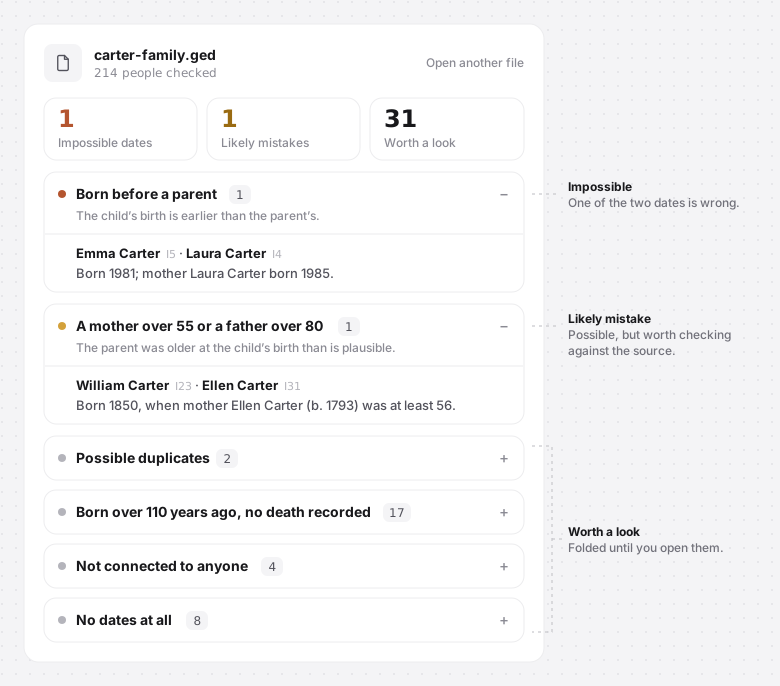
No file to hand? Try it on the sample tree on the checker page. The same report is also in the GEDCOM viewer under Statistics → Data check, where a name opens that person on the tree.
Impossible dates in a family tree
These cannot be true as written, so one of the two dates is wrong:
- Died before being born
- Born before a parent
- Married before being born — before the birth of either of the couple
- Born after the mother died
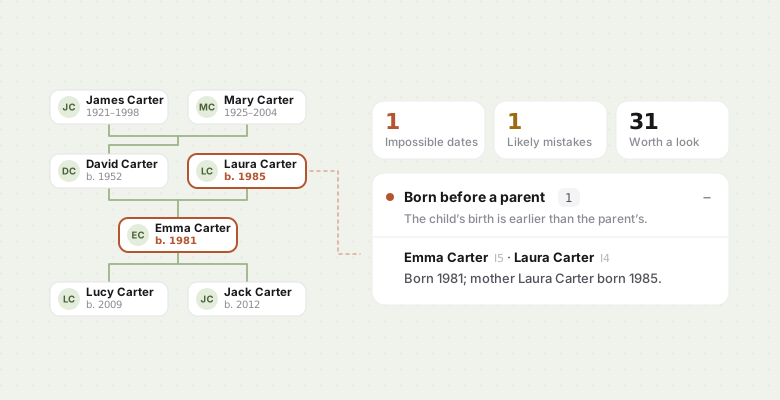
Nearly always it is a slip of the keyboard: two digits swapped (1859 for 1895), the wrong century, a date on the wrong person. In the tree above, Laura Carter's 1955 went in as 1985 — four years after her own daughter was born.
Unlikely ages: the likely mistakes
Possible, but rare enough to look at again:
- A parent younger than 12 at the child's birth — the same age FamilySearch uses for its own data-problem warnings
- A mother over 55 or a father over 80
- Born over a year after the father died — a child can be born after the father's death, but not more than a year after it
- Lived longer than 110 years
The limits sit wide on purpose, so that a mother of 50 is not a finding and the ones that are get read.
Finding duplicates and loose ends in a GEDCOM file
The last group is not wrong, only worth a look:
- Possible duplicates — the same name and birth year, and death years that do not disagree. Case, accents and punctuation are ignored, so José García matches Jose Garcia. This is what merging two trees, or importing one file twice, leaves behind.
- Born over 110 years ago, no death recorded — the people a shared tree may hide as living.
- Not connected to anyone — no parents, spouse or children in the file.
- No dates at all — not one event with a date.
These sections stay folded until you open them: in a big file they are a to-do list, not a list of errors.
How uncertain dates like "abt 1850" are read
Older dates are rarely exact. A birth worked out from a census age is abt 1793; a baptism gives you bef; two records that disagree become bet 1840 and 1845. A checker that read abt 1793 as 1793 would raise false alarms all over the older branches of a tree.
So every date is read as a span of time:
- abt 1850 (and est, cal or circa) — any year from 1848 to 1852
- bef 1850 — any time up to 1850; aft 1850 — any time after it
- bet 1840 and 1845 or from 1840 to 1845 — the whole range
- 1850 — the whole year; Mar 1850 — the whole month; a full date — that day
A check fires only when every reading of the dates breaks it. Ellen Carter's son William was born in 1850. With her birth recorded as 1793 she was at least 56, and the checker lists her. Recorded as abt 1793, she might have been born in 1795 and been 54 — so nothing is reported.
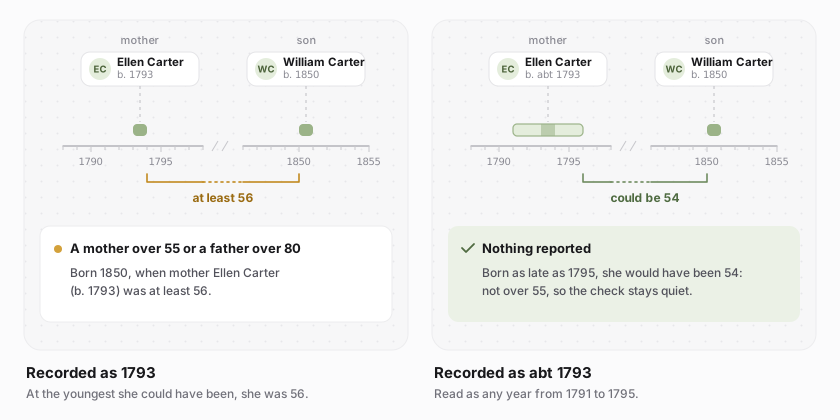
That is why a finding says at least or at most; only when both are full dates does it give an exact age. A date the checker cannot place on the calendar — a Hebrew or French Republican date, a year BC, free text such as Spring 1850 — is left out of the date checks rather than guessed at.
What to do with each finding
Impossible dates: find the wrong one. Check both dates against their sources; usually one is a plain typo. Start with the parents: a wrong year on a mother shows up once for every child born "before" her, and one correction clears them all.
Likely mistakes: check, then decide. A woman can have a child at 56, and a man can live to 111. If the source says so, the date stands: the report is a list of things to look at again, not a verdict. Two patterns are worth knowing. A father of 85 can be a father and son of the same name merged into one person, and a 115-year life can be a grandfather's birth joined to a grandson's death.
Possible duplicates: compare before you merge. The same name and year is a hint, not proof — cousins were often named after the same grandfather. Compare parents, spouses and places before merging them in your genealogy program; the ids in the report, such as I23, tell the namesakes apart.
No death recorded: add it if you know it. If you know only that the person died, a death with no date is enough for the checker to stop listing them.
Not connected, or no dates: link them or remove them. Someone with no dates slips past every date check, so even abt 1850 from a census makes the rest of the report more useful.
The checker only reads your file and changes nothing in it. Make the corrections where your tree lives, export again, and drop the new file on the checker to watch the list shrink.
Common questions
Is a GEDCOM checker the same as a GEDCOM validator?
No. A validator tests a file's grammar against the GEDCOM specification — whether each line and record is put together the way the standard says. This checker reads the family history in the file: dates, ages and links between people. A file can be perfectly valid GEDCOM and still say a woman died before she was born. To test a file against the standard itself, use one of the validators listed at gedcom.io.
Is my file uploaded anywhere?
No. The file is read and checked in your browser. Nothing is sent to a server, and nothing is kept after you close the tab.
Can I check a GEDCOM file from Ancestry or MyHeritage?
Yes. Any GEDCOM export works — from Ancestry, MyHeritage, FamilySearch, Gramps, RootsMagic or
another program — in GEDCOM 5.5, 5.5.1 or 7.0, up to 50 MB. A .gdz package from a GEDCOM
7.0 program needs unzipping first; drop the .ged inside it.
The checker has three siblings — a viewer, a spreadsheet converter and a relationship calculator — on the free tools page. New to the format? What a GEDCOM file is explains what is inside one, turning a GEDCOM file into a spreadsheet puts everyone in it into rows you can sort, and what "second cousin once removed" means untangles the relationships it holds.