 Kinfoly
How to Convert a GEDCOM File to Excel or CSV
A genealogy program is built to show a family, one person at a time. Ask it anything else — who in the file was born in Leeds, which of four hundred people still have no birth date, whose parents were never found — and you end up clicking through cards. A spreadsheet answers each of those with a filter. Getting the tree into one is the awkward part.
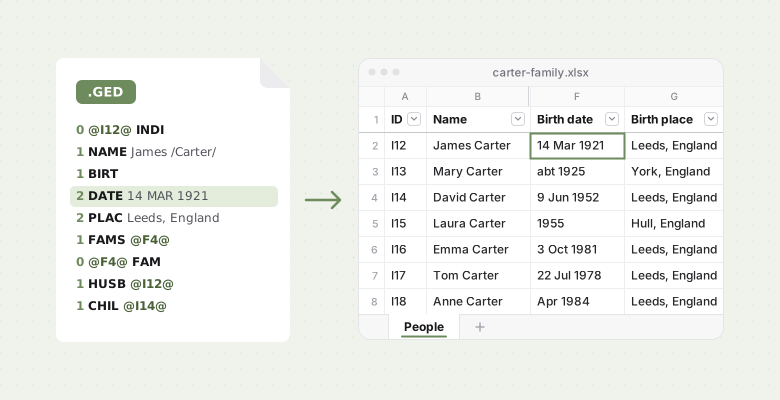
Why put a family tree in a spreadsheet?
- To find the gaps. Filter Birth date for blanks and you have everyone still missing a birth. Filter Father ID for blanks and you have the top of every line in your file — the list of what to research next.
- To narrow it down. Everyone born in Leeds, every Müller in the file, everyone married more than once — sorted, counted, printed.
- To share it. Everyone has something that opens a spreadsheet. A cousin who would never install a genealogy program will happily scroll one and fill in the dates they know.
Can you open a GEDCOM file in Excel?
Not usefully. A .ged file is plain text, so Excel will open one if you switch the Open
dialog to all files — and stack the file's lines down column A.
A GEDCOM file is not a table. One person is spread over several lines, and each line means
something only under the line above it: a DATE belongs to whichever BIRT or DEAT came
before. Sort that column and every date loses its person. Nor does a person's record name
their parents or spouse. James's says only that he is a spouse in family @F4@; it is that
family record, further down the file, that names his wife Mary and their son David.
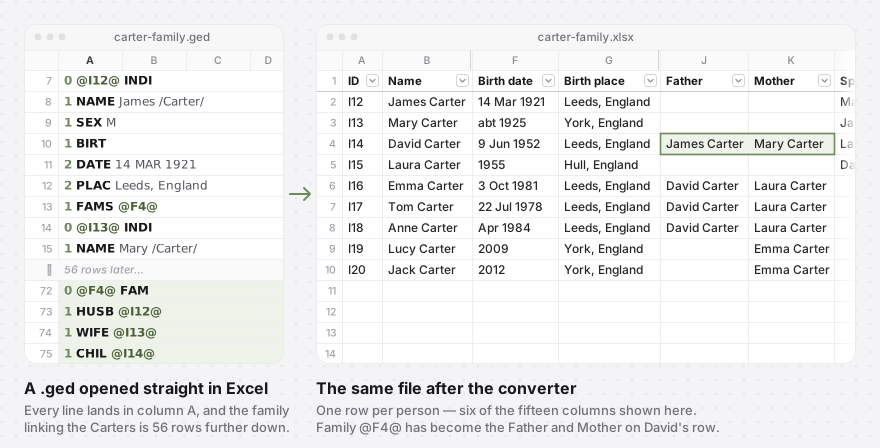
Turning that into rows means reading the whole file, following every pointer, and writing each person out once. That is the converter's job.
How to convert GEDCOM to Excel or CSV
- Open the free GEDCOM to CSV and Excel converter and drop your
.gedfile on it, or click Browse files. On a phone, tap to choose the file. No file to hand? Try it on a sample tree loads one. - Check the preview: the first six rows with every column, and how many people the file holds.
- Click Download Excel for a workbook or Download CSV for a text file. The download
is named after your file, so
carter-family.gedbecomescarter-family.xlsx.
It reads GEDCOM 5.5, 5.5.1 and 7.0 up to 50 MB, from Ancestry, MyHeritage, FamilySearch,
Gramps or any other program, in UTF-8, UTF-16, ANSI or ANSEL. A GEDCOM 7 .gdz package
needs unzipping first. If some records cannot be read, the page says how many are missing
from the spreadsheet.
The file is read in your browser. It is not uploaded, the spreadsheet is made on your own device, and nothing is kept after you close the tab. There is no account to create and no limit on how many files you convert.
What columns does the spreadsheet have?
One row per person, in the order of your file, under fifteen columns:
| Column | What it holds |
|---|---|
| ID | The person's ID in the file, such as I12 |
| Name, Given names, Surname | The main name; given names include middle names |
| Sex | M or F, empty when the file does not say |
| Birth date, Birth place | From the birth event |
| Death date, Death place | From the death event |
| Father, Mother | The parents in the first family the person is a child of |
| Spouses | Every spouse, in the order they married, separated by semicolons |
| Father ID, Mother ID, Spouse IDs | The same people by ID |
Dates are written the way the file writes them, only easier to read: 14 MAR 1921 becomes
14 Mar 1921, ABT 1925 becomes abt 1925, and a range stays a range. Nothing is guessed or
rounded, which also means the dates are text: sorting Birth date puts them in alphabetical
order. To sort by year, add a column with =RIGHT(F2,4) — it takes the year from 14 Mar
1921, abt 1925 and a bare 1955 alike — and sort on that.
There is no Children column. Children point at their parents instead, so filtering Father ID for I12 lists James's children.
CSV or Excel workbook?
For Excel, take the workbook. It has one sheet, People, with the header row bold, frozen and filtered. Every cell is stored as text, so Excel leaves each date exactly as your file writes it. The same file opens in Numbers, Google Sheets and LibreOffice.
Take the CSV for a database, a script, or a program that does not read .xlsx. It is
UTF-8 and begins with a byte-order mark, the invisible marker that tells Excel which encoding
it is reading, so Müller arrives as Müller rather than Müller. Open the CSV in Excel
anyway and two things can go wrong.
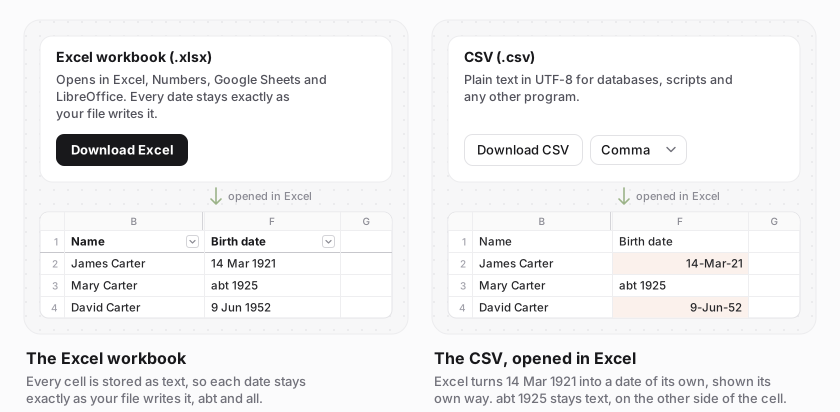
Why did Excel change my dates?
Excel turns anything that looks like a date into a date of its own and shows it its own way, often with a two-digit year. Its calendar starts in 1900, though, so 12 Mar 1850 is left alone, abt 1925 is left alone, and the Birth date column ends up holding two kinds of value that do not sort together. The workbook avoids this.
Why does Excel put the whole CSV in one column?
Where the decimal mark is a comma, as in most of Europe, Excel expects values separated by semicolons. Choose Semicolon (Excel in Europe) in the list beside the Download CSV button, or take the workbook, which has no separators at all.
How do I open the spreadsheet in Google Sheets or Numbers?
In Google Sheets, use File → Import → Upload with either file; for the CSV, untick "Convert text to numbers, dates, and formulas" to keep the dates as written. In Numbers, open either file with File → Open.
What the spreadsheet leaves out
A row per person cannot hold a whole family history. Missing from the sheet:
- Every other event. Baptisms, burials, marriages, residences, occupations and census entries have no column. Someone whose file records only a baptism has an empty Birth date, and an empty Death date can just as well mean someone is living — so not every blank is a gap.
- When and where a couple married. Spouses are named; the wedding is not.
- Sources, notes and photos. None of them come across.
- Other names. Only the main name is used, so a maiden name or a nickname recorded as a second name has no column.
- A second set of parents. Father and Mother come from the first family a person is a child of, so an adoptive family listed after the birth family is not shown.
It is also one-way: the converter does not turn a spreadsheet back into a GEDCOM file. Keep
the .ged as the master copy and treat the sheet as a view of it. Dates a cousin fills in go back into
the tree by hand — or import the same file into a free Kinfoly account
and edit the tree itself.
The converter is one of Kinfoly's free GEDCOM tools, and they all read your file
in the browser. Before you send the sheet round the family, the
GEDCOM checker finds impossible dates, unlikely ages and possible
duplicates in the same .ged, and the GEDCOM viewer shows it as a tree.
New to the format? What a GEDCOM file is explains what is
inside a .ged, and what a second cousin once removed is
helps put a name to the relatives your spreadsheet turns up.