 Kinfoly
How to Export a GEDCOM File from Ancestry — and What It Leaves Behind
Your family tree lives on Ancestry, and you want a copy of it somewhere else: on your own computer, in another program, or with a cousin who isn't a subscriber. Ancestry lets you take it, as a GEDCOM file. The button is three menus deep, though, and the file that comes out holds less than the tree you see on the screen.
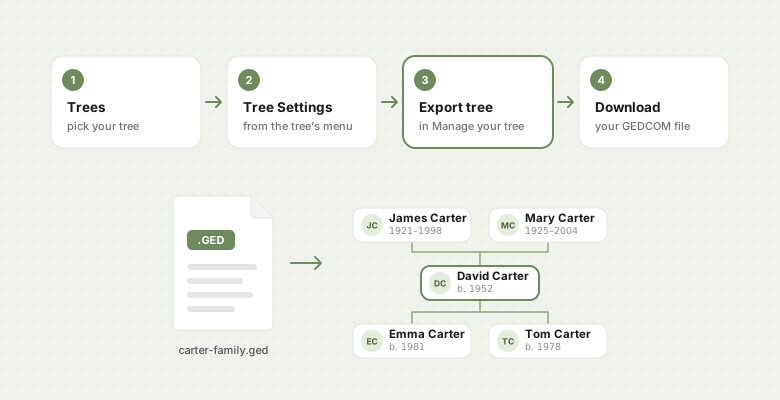
How to export a GEDCOM file from Ancestry
- Sign in on ancestry.com in a web browser, preferably on a computer. The Ancestry app has no export.
- Open Trees at the top of the page and pick the tree.
- Open the tree's menu — click the tree's name at the top left, or the three dots in the toolbar on the left — and choose Tree Settings.
- On the right of the Tree Settings page, under Manage your tree, click Export tree, then Export in the window that opens.
- Wait while Ancestry builds the file, then click Download your GEDCOM file.
A tree of a few hundred people is ready in seconds; tens of thousands can take several
minutes, and you can leave the page and come back. If it still says it is generating after
ten minutes, reload the page and start again. The file is named after the tree and ends in
.ged. If yours arrives as a .zip, unzip it and keep the .ged inside.
Ancestry writes GEDCOM 5.5.1, the version nearly every genealogy program reads.
Why can't I export a tree on Ancestry?
Because only the tree's owner can. If a relative shared their tree with you — even as an editor — the Export tree button isn't yours to press. Ask them to export it and send you the file. A tree you own, on the other hand, can be exported without a subscription.
Ancestry always exports the whole tree; there is no option for a single branch. To pass on part of it, export everything and remove the rest in a genealogy program first.
What an Ancestry GEDCOM includes — and what stays on Ancestry
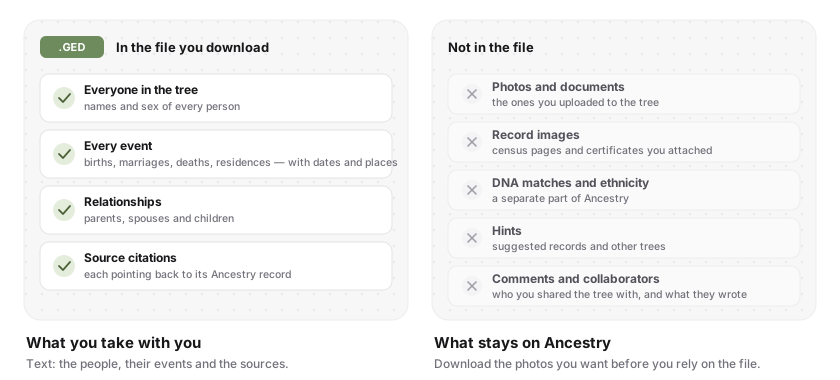
The file carries the people in your tree, every event you recorded for them with its date and place, the relationships between them, and your source citations, each pointing back to the Ancestry record it came from.
What stays behind is everything that is not text:
- Photos and documents you uploaded to the tree
- Record images you attached, such as census pages
- DNA matches and ethnicity — DNA is a separate part of Ancestry
- Hints, comments and collaborators
The photos are the loss people notice. A GEDCOM file holds text, so a picture survives only as a note of where it was stored. Save the ones you care about from the gallery before you rely on the file — or use Family Tree Maker or RootsMagic, which sync with Ancestry and can bring the media down with the tree.
What to do with the file
Open it in the free GEDCOM viewer: the tree, a list of everyone, and statistics, read in your browser without uploading anything. It is also the quickest way to see that the export is complete — the number of people should match what Ancestry shows for the tree.
Check it before it goes anywhere else. Years of hints accepted in a hurry leave children born before their parents and the same great-grandfather twice; the GEDCOM checker lists them, and how to check a GEDCOM file for errors explains what to do with each.
Sort it in a spreadsheet: turning a GEDCOM file into Excel or CSV gives you one row per person.
Move it. MyHeritage, FamilySearch, RootsMagic, Gramps and a free Kinfoly account all import GEDCOM. An import copies the tree; it does not link the two, so later changes on Ancestry will not follow it.
Keep it. A dated copy on your own drive is a backup no subscription can take away. Export again whenever you have added a branch.
Common questions
Can I export a GEDCOM from the Ancestry app?
No. The app has no export. Use ancestry.com in a web browser, ideally on a computer.
Does an Ancestry GEDCOM include DNA matches?
No. DNA matches and ethnicity estimates stay on Ancestry. Your raw DNA data is a separate download, from your DNA settings.
Will exporting change my tree on Ancestry?
No. Exporting makes a copy; the tree on Ancestry stays exactly as it was.
New to the format itself? What a GEDCOM file is explains every
line of the .ged you just downloaded, and
what a second cousin once removed is helps name the
relatives you find in it.