 Kinfoly
How to Make a Family Tree Chart from a GEDCOM File — Pedigree, Descendant or the Whole Family
Most family trees live inside a program, and that is where they are easiest to keep. The trouble starts when somebody wants one on paper: a frame for a grandparent's birthday, a sheet to pass around at a reunion, a chart for a child's school project. The tree is all there, but getting a clean page out of it often means drawing it again by hand in a design app.
You do not have to. The file your genealogy program exports — a GEDCOM file — already holds every name, date and link a chart needs, and it can be turned into one in a couple of minutes.
What is a family tree chart?
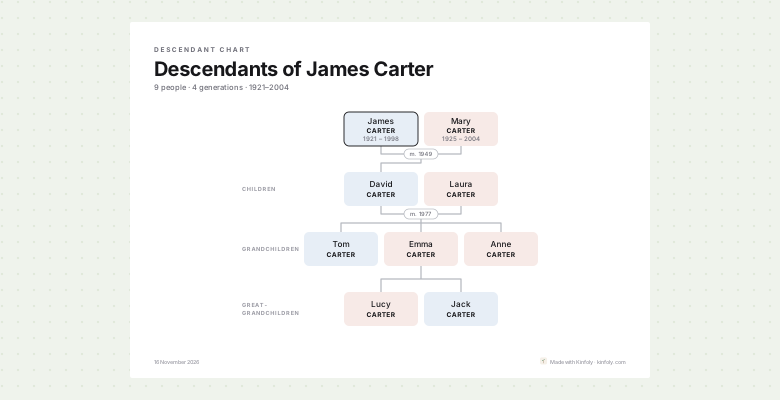
A family tree chart puts a family on one sheet, one generation to a row, with lines from parents to children. Which people go on it is what gives each kind its name:
- A pedigree chart starts with one person at the bottom and climbs through their ancestors: parents, grandparents, great-grandparents. It doubles with every generation — two parents, four grandparents, eight great-grandparents — and it is the chart most people frame.
- A descendant chart starts with a person or a couple at the top and comes down through everyone born after them, with the husbands and wives who married in.
- An hourglass chart does both around one person: ancestors above, descendants below.
- The whole tree puts everyone who is related to anyone else on the sheet.
Which family tree chart should you make?
Choose by the occasion:
- A gift for a child or grandchild: a pedigree chart with them at the bottom. It is their family, and only theirs.
- A golden wedding or a family reunion: a descendant chart of the couple everyone has in common. Every guest can find themselves on it.
- One person's place in the family: an hourglass, with their grandparents above and their grandchildren below.
- A small family, up to a few dozen people: the whole tree fits, and nobody is left out.
How to make a family tree chart from a GEDCOM file
- Export a GEDCOM file from wherever the tree lives — usually under the tree's settings or File → Export. On Ancestry it takes a few steps: how to export a GEDCOM from Ancestry.
- Drop it on the free family tree chart maker. It reads GEDCOM 5.5, 5.5.1 and 7.0 up to 50 MB, in your browser — the file is never uploaded, and no account is needed.
- Choose the chart. Whole tree, Ancestors, Descendants or Both ways; then the person it is Drawn for and how many generations to draw, back or down.
- Choose the sheet and the style. A4, A3, US Letter or US Tabloid, portrait or landscape — Best fit picks the way round that fits the tree best — and one of four looks: Modern, Sage, Heritage in a serif on cream, or Ink in black and white for any printer.
- Print it or save it — more on that below.
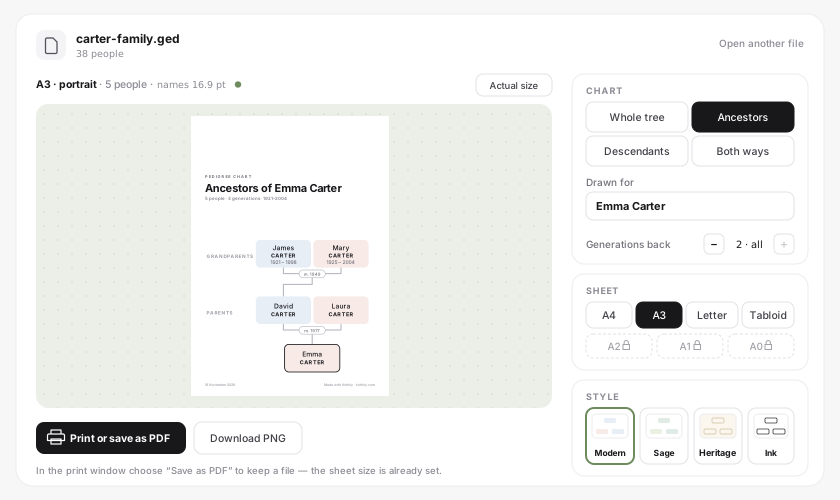
The preview is the page that prints. A small file opens as the whole tree; a large one opens as a pedigree chart of the person with the longest line of ancestors, already cut to as many generations as the sheet shows legibly.
How many generations fit on one page?
The limit is the size of the names, not the size of the tree. Above the preview the chart maker says how big they will print — names 16.9 pt — with a green dot while they are comfortable, and a warning once they drop under about 6 pt, where a name needs a magnifier.
On a pedigree chart the widest row is the top one. Four generations — someone, their parents, grandparents and great-grandparents — print comfortably on A3 or Tabloid; on A4 or Letter, three is the comfortable number. Press Actual size to see the names at the size they will come out of the printer.
When the names are too small, draw fewer generations, take a larger sheet, or turn it round: a wide tree fits landscape better. For an A2, A1 or A0 poster, or a tree cut across several A4 sheets to glue together, import the file into a free Kinfoly account and print it from there. How to print a family tree poster covers sizes, paper and what to ask a print shop.
Print it, or save it as a PDF or PNG
Print or save as PDF opens your browser's print window with the sheet size already set. Send it to a printer, or choose Save as PDF as the printer to keep a file. The PDF holds the text and lines as vectors, so it stays sharp at any print shop.
Download PNG saves a picture of the sheet at close to 300 dpi, with the resolution written into the file — the right thing for a photo book or an online printing service that asks for an image.
What the chart shows — and what it leaves out
Each person is a card with their given names, their surname in capitals and their years. A wedding year sits on the line between a couple, and each row is labelled with what it is to the person the chart is drawn for: parents, grandparents, great-grandchildren.
Some things are left off on purpose:
- Living people's years. Anyone with no death recorded who was born less than a hundred years ago is printed without them, because a chart on a wall ends up in other people's photos. You can switch that off.
- People with no relatives in the file — nobody to draw them beside.
- Step-relatives on a pedigree chart. A great-grandmother's second husband is not an ancestor, so he is not on it. A descendant chart keeps in-laws unless you untick them.
The title and the line under it are yours to rewrite — "For Grandma, Christmas 2026" is a fine subtitle.
Common questions
Is my GEDCOM file uploaded anywhere?
No. It is read, laid out and drawn in your browser, and nothing is kept after you close the tab. It goes to Kinfoly only if you choose to import it into an account.
Can I change a name or a date on the chart?
The chart prints what is in the file. Correct it in your genealogy program and open the file again, or import it into a free Kinfoly account and fix it there. Before printing, the GEDCOM checker finds impossible dates and possible duplicates in a minute.
How big a tree can it draw?
Up to a thousand people on one sheet. In a bigger file, draw one person's line — a pedigree, descendant or hourglass chart — rather than the whole tree.
The chart maker has four siblings on the free tools page. To look around the family before you print it, open the file in the GEDCOM viewer; how to read a big family tree explains ancestor, descendant and hourglass views on screen, and checking a GEDCOM file for errors is the step worth taking before anything goes on a wall.